


Wheelz - Social Drive Tracker
4.812.00 Reviews
App Specs
- Version
- 4.2
- Updated On
- License
- Free
- Downloads
- 10,000+
- Developer
- Vortac Labs Inc
- Categories
- Maps & Navigation
- Platform
- Android
Screenshots
 Analysis by AppCompare
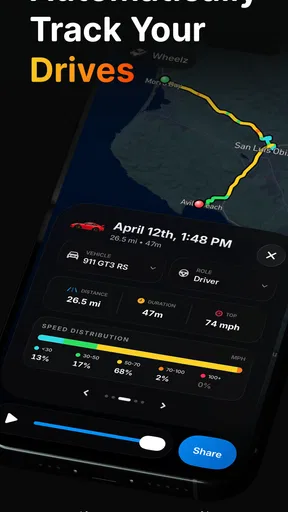
I tested Wheelz as a driving companion rather than treating it like another turn-by-turn navigation tool. Its focus is narrower and, in some ways, more useful: it brings drive tracking, friend sharing, a speedometer, and mileage records into one place. That makes it especially interesting for a household where more than one person drives the same car, or where people want a simple record of trips without building a spreadsheet.
The app comes from Vortac Labs Inc and sits in the Maps & Navigation category. It is free to install, suitable for Everyone, and supports Android 8.0 or later. The current release is version 4.2. There are optional purchases ranging from $2.99 to $39.99 per item, so I would approach it as a free starting point with paid extras to consider only after deciding whether its driving workflow fits your routine.
How Wheelz fits a shared household driving routine
The most convincing use case is not a long road trip where you already rely on a dedicated navigation app. It is the ordinary week: one person takes the car to work, another uses it for errands, and someone later wants to know how far the vehicle was driven or which trip belongs to whom. A mileage tracker can make that information easier to collect, while the sharing side can help people stay aware of a drive without sending a stream of separate messages.
Imagine a household with a parent commuting in the morning and a teenager borrowing the car in the afternoon. The commuter can record the work journey, while the second driver can use the same general idea for an appointment or shopping trip. The value is not that Wheelz magically manages the household; it is that each driver can use driving records and sharing as a common reference instead of relying on memory.
I would still set expectations carefully. This is not a replacement for a full navigation service when you need live route guidance, traffic-aware rerouting, transit directions, or a large database of places. Its strength is the drive itself: observing, recording, and sharing it. If your main question is “Which road should I take right now?”, a conventional navigation app remains the better tool.
The speedometer is also more practical than it may sound. A passenger can glance at a live speed display, and a driver can use it when the vehicle’s own instrument is difficult to read. However, I would not treat any phone-based display as a reason to look down while moving. The sensible workflow is to set things up before departure and let the driver concentrate on the road.
One phone, several drivers
Shared-device use is where the app needs a little discipline. If several people use the same phone or vehicle, the person starting a drive should make sure the correct account or user context is active before recording anything. Otherwise, the mileage history can become confusing even when the tracking itself works as intended.
Worth Reading Before You Choose

Flipboard Shows What News Apps Must Do Beyond the Feed

Switching to Android Auto Means Rethinking Your Driving Routine

Google Calendar Makes a Crowded Week Easier to Manage

Ludo King Makes the Most of the Minutes Between Plans

Baby Panda World Brings Quick Play to Modern Phones, but Its Game Library Feels Busy

ESPN’s Live Game View Makes Following Close Games Easier
That is an important boundary: a shared car does not automatically mean a shared driving identity. I would avoid treating one account as a perfect household ledger unless everyone agrees on how to label or separate their trips. For personal records, the cleanest approach is for each regular driver to use their own account where possible, rather than assuming that one device should represent everyone.
This matters for more than neatness. Mileage can be used for maintenance planning, reimbursement, or simply understanding how much a car is being used. Mixing a short errand, a school run, and a work commute under one undifferentiated history makes those later decisions less reliable. Wheelz can support a useful routine, but the household still has to decide who records what.
My practical advice is to agree on a small rule before anyone starts: the driver begins tracking before pulling away, ends it after parking, and checks that the right sharing choice is being used. That sounds obvious, yet it prevents the most common kind of tracking confusion—an incomplete trip attributed to the wrong person or left running after the journey ends.
Setup boundaries worth deciding first
Because the app combines tracking and social sharing, I would not install it on a family device and immediately hand it to every driver without a conversation. Decide who should see a drive, when sharing is useful, and whether mileage is being kept for private reference or for a shared household purpose. The app can be part of that arrangement, but it should not define the arrangement for you.
For a couple sharing a car, a simple split may be enough: individual accounts for personal driving, with selected trips shared when coordination matters. For a parent and older child, the discussion may be more about trust and expectations than technology. The app can show a record of a drive, but that does not make it a substitute for agreeing on when the car may be used or where it may go.
I also recommend checking the tracking state before leaving a parking space. A speedometer and trip recorder are useful only when the session has been started deliberately. Starting the app while already driving creates an unnecessary distraction and can result in a partial record. The best setup is boring: prepare while stationary, confirm the intended sharing behavior, then put the phone away.
Another useful habit is to review mileage at a fixed time rather than constantly checking it. A weekly household review can reveal whether a service trip was recorded, whether a borrowed car was returned after an unusually long journey, or whether the records are too messy to be worth keeping. This turns Wheelz from a passive tracker into a manageable routine.
Sharing for coordination, not supervision
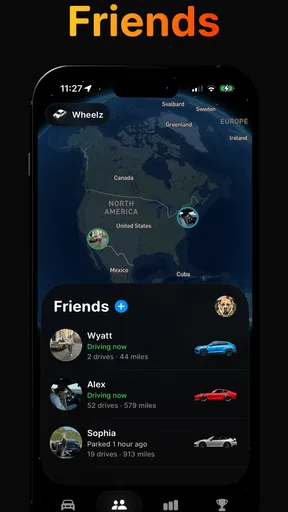
The friend-sharing element makes sense when people need awareness during a drive. A friend may want to know that someone has started a journey, or a household member may want a simple update without repeatedly asking for messages. That is a more focused use than broadcasting every movement to everyone.
I would use sharing selectively. A drive to meet someone, a long journey, or a pickup where timing matters can benefit from it. Routine trips may not need to be shared at all. The less indiscriminate the sharing habit, the easier it is to keep the app useful rather than turning it into background noise.
There is also a coordination trade-off. Sharing can reduce uncertainty, but it can create an expectation that the driver is continuously available to answer questions. That is not a good assumption. Once the trip begins, the driver should not be expected to interact with the phone. If a household needs detailed check-ins, the better solution is a prearranged message before departure or after arrival, not constant attention to the tracking screen.
For shared-device households, I would be especially careful about leaving the wrong person’s social setup active. A teenager borrowing a parent’s phone, for example, should not accidentally share a trip through the parent’s contacts or account context. The app’s usefulness depends on the boundary between the person driving and the person who owns the device being clear.
This is one of Wheelz’s less obvious trade-offs: convenience increases when everyone uses the same familiar workflow, but privacy and attribution become more important as more people participate. A small household agreement can solve much of that friction, while an unplanned shared setup can make the records and social side uncomfortable.
Age, trust, and responsible use
Wheelz carries an Everyone content rating, which makes it approachable from a store-classification perspective. That should not be confused with independent driving readiness. A younger person may be able to understand the app, but operating a phone while driving is still unsafe. Any household using it with a young driver should make the rule explicit: setup happens before departure, and interaction waits until the vehicle is safely parked.
For parents, the app may be useful as a shared travel tool, but I would avoid presenting it as a hidden surveillance system. Trust is easier to maintain when the young driver knows what is being recorded and who can see a shared trip. If the goal is simply to coordinate a pickup, share only what is needed. If the goal is mileage tracking, explain why the record matters. Clear expectations are more valuable than quietly collecting more information.
The same principle applies between adults. A partner may appreciate knowing that a long drive has started, while another person may see constant location sharing as intrusive. Wheelz gives the household a way to coordinate around drives, but the respectful choice is to agree on sharing boundaries rather than treating availability as automatic.
I also would not use the app as proof of a person’s driving quality. A speedometer can display speed, and a trip record can show a journey, but neither one captures the full context of traffic, weather, road design, or driver decisions. Records are helpful for mileage and coordination; they are a poor basis for making sweeping judgments about someone.
What the mileage tools are good for
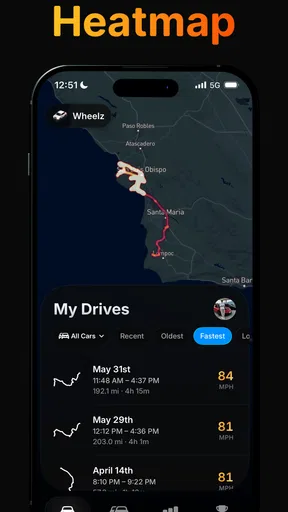
The mileage function is the part I can see becoming quietly valuable over time. Instead of trying to reconstruct driving from fuel receipts or memory, a household can build a more consistent picture of vehicle use. That can help when planning maintenance conversations, estimating how often the car is used, or separating personal travel from work-related journeys.
The key is consistency. If one driver tracks every journey and another starts only occasionally, the total will not tell the whole story. I would use the app for a defined purpose—such as recording work travel or monitoring a shared car for a month—rather than assuming that an incomplete history is automatically precise.
A useful workflow is to pair the app with a simple note about the reason for unusual trips. A long weekend journey or a visit to a distant service center may otherwise look like ordinary mileage later. Wheelz can provide the driving record, while the household keeps the small amount of context needed to interpret it.
This is also where it differs from a vehicle’s built-in trip computer. The car may show distance for a current journey, but an app can be easier to connect with personal sharing and a continuing record. On the other hand, the car’s own display may be more convenient for basic driving information and does not depend on remembering to start a phone session. I see Wheelz as a companion to that system, not an automatic replacement.
How it compares with familiar alternatives
Compared with Google Maps or Apple Maps, Wheelz is less about discovering a route and more about documenting the drive. If you need traffic conditions, turn-by-turn directions, business searches, or a broad travel-planning ecosystem, those established navigation tools are stronger choices. Wheelz becomes more appealing when the route is already known and the record or sharing matters more than guidance.
Compared with a dedicated mileage journal, it should be easier to connect driving activity with a live trip and social coordination. A manual spreadsheet can still be better for detailed business accounting, custom categories, or records that need a very specific format. The trade-off is convenience versus control: Wheelz offers a more immediate driving workflow, while a spreadsheet gives you more freedom after the fact.
Compared with a vehicle telematics system, the app is more portable because it follows the phone rather than being tied to one car’s hardware. That is useful for people who drive different vehicles. The downside is that household attribution depends more heavily on correct setup, and a phone-based workflow requires the driver to remember the session.
Compared with a family-location product, Wheelz has a more specific driving purpose. That can be a benefit if you want to avoid turning every household movement into a permanent social feed. It can also be a limitation if your priority is broad family coordination beyond drives. I would choose it for driving records and trip sharing, not as an all-purpose family safety platform.
Free access and optional spending
The app is free, which makes trying the basic workflow relatively easy. That is important here because the real question is not whether a speedometer or trip log sounds useful; it is whether everyone in the household will actually use the same routine consistently.
Optional purchases cost from $2.99 to $39.99 per item. I would not buy anything immediately. First, test a normal week: start a few drives, finish them properly, see whether sharing fits your household, and review whether the mileage record is understandable. Only then can you judge whether a paid addition solves a real problem rather than adding complexity to an app you barely use.
That pricing range also means the word “free” should be read as an entry point, not as a guarantee that every desirable capability has no cost. Before paying, I would check exactly what an item adds and whether it benefits the person driving, the person coordinating, or nobody in particular. In a shared household, one person may value a feature that the rest never touches.
Who should use it, and who should skip it
I think Wheelz is a good fit for drivers who want a lightweight record of journeys, people who occasionally need to share a drive with friends, and households trying to coordinate use of one or more cars without relying entirely on messages. It is also worth considering if your existing navigation app gets you where you need to go but does nothing useful with the journey afterward.
I would skip it if you want a complete navigation replacement, automatic household accounting with no setup decisions, or a formal fleet-management system. It is not the right answer for someone who dislikes location-related sharing altogether, either. Even a focused driving app requires you to think about who can see a trip and whether that visibility is appropriate.
It may also be a poor match for drivers who routinely forget to start and stop tracking. A manual step is not a flaw by itself, but it becomes a serious weakness when your main reason for installing the app is accurate mileage. In that situation, a vehicle system with automatic trip detection may suit you better, even if it offers less social coordination.
My household verdict
After using it as a driving tracker rather than a traditional map, I see Wheelz as a focused tool with a sensible place in a shared-car routine. Its combination of trip records, mileage tracking, speed display, and friend sharing is more practical than the short store wording suggests, especially when the household agrees on account boundaries and sharing habits before the first trip.
The app’s strong average rating of 4.8 from roughly 590 ratings and more than ten thousand installs suggests that it has found an audience, but those figures should not decide the purchase for you. The important test is personal: will it make your driving records clearer, and will sharing reduce coordination effort without creating unwanted pressure?
My recommendation is to start with one defined use case, such as recording a shared car’s weekday trips or sharing longer journeys with a partner. Keep the phone interaction stationary, use separate identities when several people drive, and review the mileage regularly instead of expecting perfect records automatically. With those boundaries, Wheelz can be a useful household driving companion. Without them, it risks becoming another app that collects inconsistent trip history while everyone assumes someone else is managing it.
Pros
- Tracks drives automatically with minimal interaction.
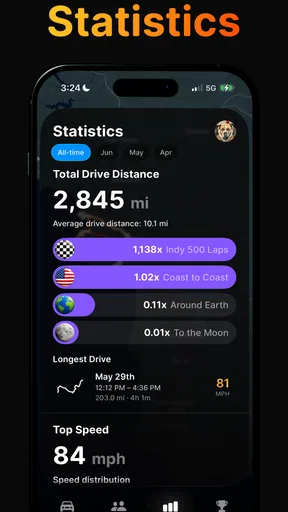
- Turns driving history into clear
- easy-to-read statistics.
- Useful for monitoring mileage
- routes
- and driving habits.
- Social features make sharing trips and progress more engaging.
- Can help users become more aware of fuel and travel patterns.
Cons
- Automatic tracking may reduce battery life during frequent driving.
- Location permissions are required for accurate route recording.
- Background tracking can raise privacy concerns for some users.
- Social functions may feel unnecessary to users seeking a private log.
- Accuracy can vary when GPS signals are weak or unavailable.
FAQs for Wheelz - Social Drive Tracker
What is Wheelz - Social Drive Tracker and how does it work?
Wheelz - Social Drive Tracker is designed to help drivers record, organize, and share information about their journeys. After installing the app, users can typically create a driving profile, track trips, and review details such as routes or driving activity. Its social features may also allow interaction with other users, making it useful for people who enjoy documenting and discussing their time on the road.
Does Wheelz require location access to track my drives?
Yes, location access is generally necessary for a drive-tracking application to record routes and movement accurately. Wheelz may request permission to use your location while the app is active or in the background, depending on which tracking features you enable. Before accepting, review the permission settings and choose the option that matches your comfort level, especially if you are concerned about battery use or privacy.
Can I use Wheelz without sharing my driving activity publicly?
The app may include social sharing options, but you should normally be able to control what information is visible to other users through privacy or profile settings. Before starting a trip, check whether the activity is private, shared with selected contacts, or posted publicly. Avoid publishing sensitive details such as your home address, regular routes, or real-time location unless you fully understand the audience and privacy controls.
Does Wheelz work without an internet connection?
Some tracking functions may continue to work when your phone temporarily loses mobile data or Wi-Fi, particularly if the app can use the device’s GPS and save trip information locally. However, social features, map loading, account synchronization, and sharing usually require an internet connection. If you plan to drive through areas with weak coverage, test the app beforehand and confirm how offline data is stored and uploaded later.
Is Wheelz free to download, and are there any additional costs?
Wheelz may be available as a free download, but the exact pricing model can depend on the platform, region, and current version of the app. Some features could require in-app purchases, subscriptions, or paid services, while advertising may be included in the free experience. Check the Google Play Store or Apple App Store listing before downloading to review available plans, billing terms, and cancellation conditions.


